Chronology Creator
Turn Your Timeline Data Into a Formatted Chronology Report — With One Click
Reveal the full picture — in a format that’s ready to share.
Whether you’re documenting an investigation, building a case record, or organizing research data, there comes a point where you need more than a visual chart.
You need a clean, formatted list of events — accurate, complete, and ready to share.
Timeline Maker Pro is your chronology creator — generating a formatted, print-ready chronology report from your timeline data with one click. No reformatting. No copy-pasting.
What the Chronology Report Looks Like
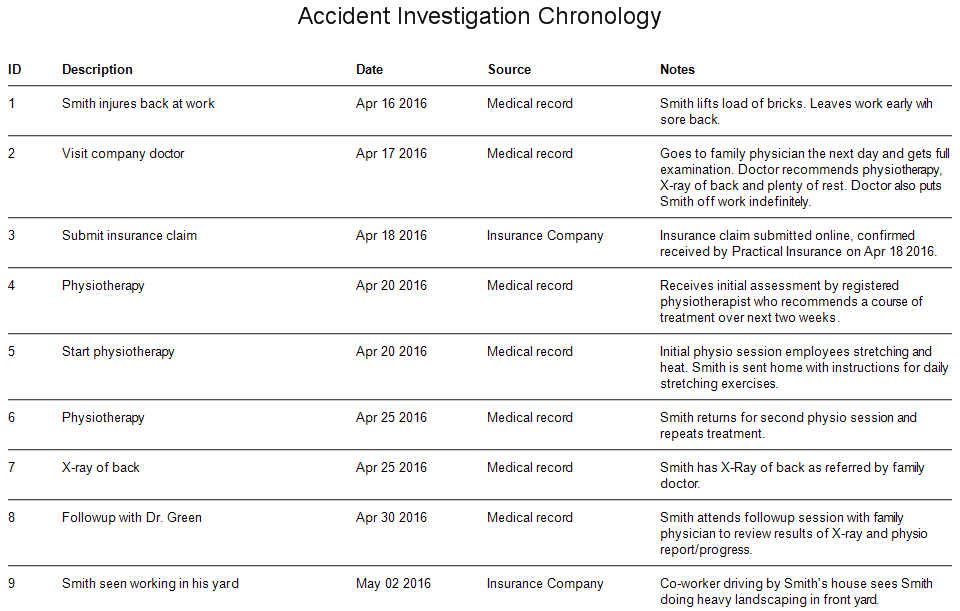
The chronology report displays your events in chronological order with the columns that matter to your work — event description, start and end dates, duration, category, notes, and any custom columns you define. Your choice.
Customizable to Your Workflow
No two investigations, cases or research projects are the same — and your chronology shouldn’t be either. Timeline Maker Pro gives you control over how your data is organized and displayed. Column setup happens in the Event Entry screen and flows automatically into your chronology report:
- Add custom columns — Source, Location, Subject, Reference, or whatever your workflow requires
- Rename existing columns to match your terminology
- Arrange columns in any order by drag and drop
- Choose which columns appear on each chronology report from a simple dropdown list
- Sort your chronology report by any column — date, category, source, or any custom column you define
- Create multiple chronology reports from the same data
First time users often don’t realize how flexible the column system is. Within minutes you can configure your columns to match exactly how you work — not the other way around.
The Same Data. Every Format You Need.
Timeline Maker Pro is the chronology creator that stores your event data once. From that single dataset you can create a Chronology Report, Flag Chart, Bar Chart or Vertical Chart — with one click. Change your data once and every format updates automatically.
Print, Copy, Share and Present
Like all Timeline Maker Pro chart formats, your chronology report can be printed, saved as PDF, shared as an interactive presentation, or saved as an image — with one click.
Built for Investigators & Researchers Who Work With Sensitive Data
Unlike cloud-based tools, Timeline Maker Pro runs entirely on your computer. Your data never leaves your computer or internal network — never in the cloud. No subscription. No cloud storage.
- One-time purchase — no monthly fees
- Works offline — no internet connection required
- Your data stays on your computer or internal network — complete privacy and security
- Trusted by investigators & researchers in 86 countries
Try Timeline Maker Pro Free for 14 Days
“I am in law enforcement and we use Timeline Maker on big cases which involve several defendants. We sampled several timeline software programs and Timeline Maker was hands down the best program available. It’s ease of use for entering data is simple and saves hours from how we used to create timelines. The charts are great and easy to understand. ”
Ron K.
Detective, Billings Police Dept.